1 Apr 2016

Google is Now Offering Photography Tools Worth $149 for Free


Google’s Nik Collection was earlier available for $149 and now the company is offering it for free. Nik Collection consists of seven desktop plugins which will be now available for free.


Google is Now Offering Photography Tools Worth $149 for Free

Google’s Nike Collection comes with seven premium photo editing plugins which earlier had a price tag of $149 and is now available for free. If you are a photography lover, then this toolkit may be helpful to you. Nik Collection comes with tools like Analog Efex Pro, Color Efex Pro, Silver Efex Pro, Viveza, HDR Efex Pro, Sharpener Pro, & Dfine which when downloaded can be used with Photoshop as well as Aperture and Lightroom.


“Photo enthusiasts all over the world use the Nik Collection to get the best out of their images every day. As we continue to focus our long-term investments in building incredible photo editing tools for mobile, including Google Photos and Snapseed, we’ve decided to make the Nik Collection desktop suite available for free, so that now anyone can use it” states Nik Collection.
Earlier, this toolkit had a price tag of $149 and many users purchased it, however in order to not disappoint them, Google has decided to refund the whole amount to them.
Nik Collection comes with seven desktop plugins which offers numerous photo editing features ranging from filter applications (Improves Color Correction), retouching/creative effects, image sharpening, color adjustment and tonality of the pictures.
As discussed above, this tools will be really helpful for photography lovers, in fact it is available for free to everyone. If you want to download Nik Collection,click here.

How To Directly Download Apk from Google Play Store on PC & Android


For Android users, we are here with a method to Directly Download Apk from Google Play Store on your Computer and Android Mobile.

Today millions of people are using an android device and they love to download and install new apps on their android device, and why not? This app’s help in customizing their android experience. Maximum of the android users downloads and install apps from Google Play Store because there are numbers of convenient apps available now. So in this post, I will tell you the method to Download App’s apk directly on your computer. So have a look at the methods discussed below to proceed

How To Directly Download Apk from Google Play Store on PC & Android

The method that we have discussed below is based on some websites that will allow you to download your apk files on your Android and PC. So have a look on these websites to download Apk files directly on your computer

Websites To Directly Download Apk from Google Play Store In Your Android & PC :

#1 Apkleecher.com

This is the cool site where you can directly download apk file of any app of google play store. In this app, you just have to type the app name package in the text field and the site will give you the direct apk download link of that app, you can download it and later can transfer it to your android phone.

#2 Downloader-apk.com

directly download your desired apk files by getting the  URL of your desired app. You can paste the Google Play store app ID to get the apk file for your desired apps. So open the site and  have apk files of your favorite apps.

#3 Evozi Apk Downloader

By using this site you can download all your favorite app’s directly as apk file in your device. Through this, you can even download massive game files too! Just paste the play store link of the app and download it directly to your computer.

#4. APK-Dl.com

It was the newest apk downloader. The reason it is gaining popularity was because this site has some features that make downloading apk files a fun, You can download apps from google play store by simply editing URL, you just need to change play.google.com to APK-DL.com, then a file will appear for download!

#5. apkpure.com

APKPure is the best online download which lets you download an app from  reliable apps source Google play. The also offer the most comprehensive collections of Android Games, Apps, and all other needed apk files. You just need to paste the google play app URL and you will be able to download the apk file directly on your computer.
So beyond is all about How To Directly Download Apk from Google Play Store on PC/Android. With these, you can easily download your favorite apps as apk file in your device another benefit of downloading apk files on your computer is you don’t need to worry about app backup as you will always have the apk file of your desired app on your computer. Hope you like this cool post, do share with others too. Leave a comment below if you have any related queries with this.

Google’s Gmail April Fool Prank Fails Horribly


Every Google adopts a new way to make jokes on April fools day and now this April it introduced a new prank in Gmail today. However, this prank went horribly and Google later took it down.

Google’s Gmail April Fool Prank Fails Horribly

Google introduced Gmail Mic Drop Button, adjacent to the send button, which ends an email thread forever by muting all future replies to the sender and then displaying a GIF of a minion “mic dropping” at the meantime.
Google in a blog post said that “Well, it looks like we pranked ourselves this year.” It further said that this feature went wrong due to the bug that witnessed Mic Drop feature caused “more headaches than laughs.” Google said “We’re truly sorry. The feature has been turned off. If you are still seeing it, please reload your Gmail page,”.
“I just sent off an email with my resume to the first person who wanted to interview me in months,” claims Google user at forum. ” I clicked the wrong button and sent it with the mic drop. Well, I guess I’m not getting that job. Words cannot describe how pissed off I am right now.  I’m actually shaking.  One click, ONE CLICK and I lost the job.  Goddamnit.  Not funny, google.  I’m going to go cry now.”
Google was badly criticized by the users on Gmail’s April fools feature as this costed them their jobs. One user at Gmail’s help forum said, “Thanks to Mic Drop I just lost my job.”
Another user at Google’s forum said, “This sounds like such a joke, but unfortunately it is not.  I sent out an important email to 30 recipients and I inadvertently clicked the “Mic Drop” Send.  I completely did not mean to, and I realized what had happened after the fact. I tried to resend it without that, but it was too late.  Is there any way I can un-do my mic drop feature?”.
Google has been making April Fools day pranks but this year it was the first time that Google witnessed backlash from the users and criticism.

Best Websites To Download PC Games For Free

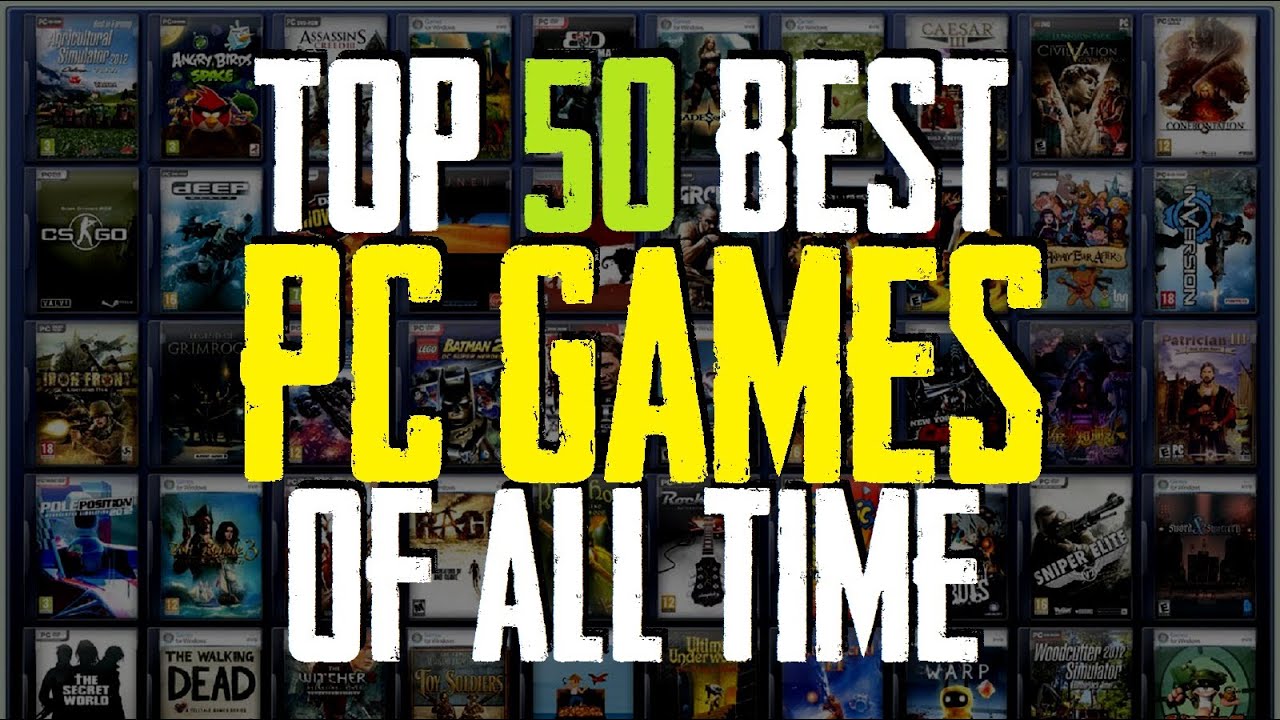
We are going to share some best websites to download PC games for free. We had listed 10 websites that will help you download games on your PC.


For gamers, we are here with best websites to download PC games for free. Gaming is the excellent way to spend your free time. And all gamers prefer to examine out all modern games in their gaming computers. But downloading games can quite be irritating for the user who doesn’t know the accurate site for this. So for those users, we are here with the list of some best sites from which you can download your favorite games for free. So have a look at the complete discussion below.

Top 10 Best Websites To Download PC Games For Free

So below we have some of the best sites from where you can get your favorite games for PC. And these sites have the huge collection of  games that you will love to play on your computer. So watch out the list of these sites below.

Collection Of 10 Best Websites To Download PC Games For Free

#1 Acid Play

Top 10 Best Websites To Download PC Games For Free
This is one of the best sites where you can easily get your favorite games. Site builders had used systems like search, ratings, and recommendations to build a site that will help you find and download the perfect game in less than a minute. You can download most freeware games directly from their download servers. And there all games are scanned downloads using ClamAV, so they’re safe, secure and fast

#2 Origin On The House

This is one of the best sites where you will get the premium games for free. The days comes when your desired games are freely available for your PC. So must visit the site regularly to and get your favorite PC games for free.

#3 AllGamesAtoZ

The another best website where you can get all your games for free to download to your PC. It is a free online gaming source which provides you gamelists, game downloads and game reviews and lots more that you will get to know after visiting the site.

#4 Mega Games

Mega games is another good site where you can search out for any games and can directly download the game  on your PC for free. Also there you can get theHD 3d games for free to download and all the PlayStation games for your PC.

#5 Caiman.us

This is one of the best sites where you can get best games for free on your Pc. One of the best sites where you can find the huge collection of the best gamesthat you will love to play in your PC and all the games are free here.
FreePCGamers is a website focused on free games. Games that are unfairly overlooked since a lot of them maintain great qualities. This site reviews those games to make sure they get their 15 minutes of fame. They cover all game genres: action, adventure, casual, girl games, first-person shooter, musical, platformer, racing, role playing games, simulation, sports, strategy, and more.

#7 Full games.sk

Full games.sk provides various Best PC games such as Action games, Strategic games, logic games, adventure games,sports and racing games and lots more that you will get to know after visiting the site. In this site, you will find a number of free computer games that can be downloaded with free of cost.

#8 Gametop

Freeware games are there on this site. Here you will get all the Latest Games, Most Popular, Most Played, Random Games. It also had some small games which are just addictive! You must visit the site and get your free games from this site.

#9 Reloaded

This is one of the best sites where you will get all your favorite games.  It provides freeware games, all screenshotted with reviews, popular remakes, music and extras and much more.

#10 Pogo

An awesome on-line gaming site with hundreds of games available to play after completing a simple registration. Play games with your friends for free here.
So above are the Top 10 Best Websites To Download PC Games For Free. Visit the sites and search out your preferred games there and get all cool games for your PC for free. Hope you like the sites discussed right here, share this with others too. Leave a comment if you want to give any suggestion.

3 Best Ways To Find Serial Key Of Any Software

Product key is inturn paid for the user and at the end of day software is freeware only for few days. But there is method by which you can use these software for free. So have a look on complete method discussed below to proceed.


If you are being tired of finding the serial key of the software that you want premium access or want to use them after certain time period, then you are right place as here is the 3 best methods that you can use. Today there are many software that are not exactly paid that is they are freely available on internet to download. But some of these software need a renewal product key for further access the service of the softwares. Mostly these softwares are third party software.

Top 3 Best Ways To Find Serial Key Of Any Software

So below we had listed some of the best ways that you can use to get the serial key of any of the software that you want to crack. So use them and one of them must be working for you.

1 Through Google Search

There might be many sites that are available on the internet that may provide you with various codes or activation keys for many software but it could be a no easy task to find the one you need correctly.Here you just follow the steps given below to know how you can find the exact activation key that you want through simple google search only
1. At the first step you just has to open Google.
2. Secondly type the software name and 94FBR after space in the search bar and then search it.(For e.g. Nero express 94FBR).
3. In the search result you will directly see the activation key for the provided software name.

#2 Key finder Software

These type of softwares just need the name and version of the software that you want to crack and the key finder will find the probable activation key.There are many such type of key finding softwares available and these do work but the most popualar one is Product Key finder that you can download.
You can try the tool like Magical Jelly Bean Keyfinder.

3 Crack Of the Software

There are crack files available on network for many paid softwares that creates a loop in the software that can remove the activation menu and you can use the software without being asked for activation.You just has to install the crack file in the particular location and use the software normally.
For finding the crack of any tool just find the software name along with crack and you will surely get the relevant result.
So above is all about Best Ways To Find Serial Key Of Any Software. By these method you can easily get product,activation and serial key of any software and freely use that paid software .And there will be no need to scroll different sites and just wasting your time over different websites. Hope you like the post don’t forget to share it with your friends and leave a comment below if you have any related queries with this.

If You Like Fedora, You'll Love Korora

The Korora Linux desktop is a solid computing platform that's loaded with options to suit a wide range of user needs.
Korora 23 final was released last month. It's a Fedora-based distribution featuring many user-friendly enhancements as well as a choice of five desktop environments. Fedora is the community version of Red Hat Linux Enterprise.
Unless you are looking for bleeding-edge desktop environments, Korora gives you all the top contenders. You can run Cinnamon, GNOME, KDE, MATE and Xfce.
I tested all of these Korora options and was pleased with how each one performed. I focused the "Look and Feel" portion below on the MATE desktop flavor because I was impressed with its integration in Korora much more than in other distros. For anyone unhappy with the current GNOME 3 style, the MATE fork is a refreshing alternative.

Korora GNOME desktop
Even Linux users who dislike the GNOME 3 desktop will feel right at home with the Korora version.

Korora's developers gave the entire line a similar appearance. Korora adheres to the Fedora design, which places the panel at the top of the screen. That consistency really pays off.
I tend to view top-panel design as old-style Linux because so many of the distros I use place the panel at the bottom of the screen. However, the top-panel placement feels like a natural in Korora. That holds true especially for the Cinnamon desktop version. I use Cinnamon in other distros and was surprised at how the panel on top did not bother me.

Korora GNOME desktop
If you love the Cinnamon desktop, you will adore its integration in Korora 23.

Code-named Coral, the entire Korora 23 line has the latest stable RPM Fusion repositories. These community packages provide support for things that Fedora normally does not ship, like multimedia codecs and proprietary kernel drivers.


Korora Kudos

The Korora distro is a growing project started by lead developer Chris Smart about 10 years ago as Kororaa. Its name comes from the Māori word for "the little penguin." His purpose was to quickly reproduce a Gentoo Linux installation on multiple desktop machines. The distro started with just two flavors -- GNOME and KDE. Cinnamon, MATE and Xfce got added along the way.
Smart discontinued that project in late 2007 only to reintroduce it nearly three years later as a Fedora Remix. With the release of version 18 in 2013, he changed the project's name to Korora.
Korora offers a lot to like, starting with its installation. The process is effortless.
Using Korora is, too. Even if you are not familiar with Red Hat or Fedora, you can use Korora without any fiddling.

Common Factors

Although there's little to no fiddling involved with installing and using the distro, Korora does require a little special treatment if you want to include a few extras. That's because it has to comply with licensing agreements associated with the Fedora community.
For instance, proprietary software drivers such as Nvidia and packages like Google Chrome are not preinstalled. To get these items, use the Pharlap device manager in the Control Center of the Systems menu.
Korora's default applications include Mozilla's Web browser, LibreOffice suite, Shotwell photo manager, Audacious music manager, the OpenShot video editor and the VLC media player. Many other Linux staples are prepackaged in their related desktop versions.
For example, the Kdenlive video editor comes with the KDE version. MATE classics like Eye of MATE image viewer are bundled in that desktop. Many of the Linux applications you use in your favorite distro also are included in all the Korora versions.

Look and Feel

MATE has the familiar look and feel of the old-style GNOME but is infused with the advanced growth of the Fedora line under the hood. By default, the desktop has two panels.

Korora's MATE desktop
Korora's MATE desktop version is a fresh, modern take on the GNOME 2 fork. It has two panels and all the classic Linux design you need.

The top panel holds the launchers for the drop-down menus for applications, paces and system apps on the left side. To the right but not centered are icons to launch the Caja file manager, MATE terminal and the default Firefox Web browser.
To the far right is the usual tray to hold the calendar, audio and connection controls. A launcher is also in this tray for Universal Access Preferences selection box.
The bottom panel holds the open application window indicators, the show desktop button and the workplace switcher.
An attractive collection of background images rotates every few minutes by default. Convenience is the intent with MATE. Nearly every place you go has right-click access to navigational commands or context menus.
That includes the desktop itself. This right-click accessibility is one of the major advantages of the Xfce desktop. Its inclusion here makes MATE the best of both environmental worlds.

Bottom Line

Korora's use-it-out-of-the-box philosophy is one of the reasons the distro keeps getting better. If you want a better, more user-friendly Linux distro that reaches beyond Fedora's enterprise appeal, you can't go wrong with any of Korora's five desktop versions. It leaves little for users to desire and makes choosing another distro unnecessary to get your preferred interface.
Korora stays true to its mission. It promised an easier Linux for new users without sacrificing either power or features for seasoned Linuxers.

Want to Suggest a Review?

Is there a Linux software application or distro you'd like to suggest for review? Something you love or would like to get to know?
Please email your ideas to me, and I'll consider them for a future Linux Picks and Pans column.
And use the Talkback feature below to add your comments!

Google Gets Serious About Cloud Services

Google Gets Serious About Cloud ServicesGoogle, which lags far behind Amazon and Microsoft in the cloud infrastructure services space, last week released a slew of machine learning and analytics products and services.

The Cloud Machine Learning platform provides access through REST APIs to the technologies powering Google Now, Google Photos and voice recognition in Google Search.
The tools are designed to let users build predictive analytics models with their own training data through the open source TensorFlow machine learning library.
Cloud Machine Learning will take care of everything from data ingestion to prediction, Google said.
It is well integrated with other Google Cloud Platform products such as Cloud Dataflow, BigQuery, Cloud Dataproc, Cloud Storage and Cloud Datalab, the company said.

More About the Tools

Google also released a full set of APIs that let apps see, hear and translate.
It added new services and capabilities to Cloud Dataproc, its managed Apache Hadoop and Apache Spark service.
    The company also added the following features to its BigQuery analytics data warehouse:
  • Long Term Storage, which automatically cuts the price of storage 50 percent after 90 days;
  • Capacitor storage engine, which accelerates many queries by up to 10x;
  • Poseidon, a mechanism that improves data ingest and export speed 5x;
  • Direct query and import of Apache AVRO files;
  • Automatic schema detection of JSON and CSV files; and
  • Public Datasets Program, which lets users host, share and analyze public data sets.
Automatic Table Partitions, which lets users partition tables by date and query the date ranges they want, will be added to BigQuery soon, Google said.
All of the features will be sent to users automatically without any upgrades or downtime.
Google is continuing to develop its Tensor machine learning system. TensorFlow Serving can be used with Kubernetes, another Google open source project, to scale and serve machine learning models.
Apache Beam, a new project on the Apache Incubator, lets users define data processing pipelines that can execute in either streaming or batch mode. It consists of a dataflow model, SDKs and runners submitted by Google and partners Cloudera, Talend and Data Artisans.
The Google Cloud Vision API has entered beta and is available to anyone.

Getting its Act in Gear

Amazon Web Services had 31 percent of the global cloud infrastructure services market in 2015, according to Synergy Research. Microsoft came in second with 9 percent, followed by IBM with 7 percent, and Google with 4 percent.
"Finally, Google's taking the enterprise battle for the cloud seriously, and it's not too late to compete," said Al Hilwa, a research program director at IDC Seattle.
"AWS and [Microsoft] Azure have been more enterprise focused and have garnered early leadership," he told the E-Commerce Times, but "the situation is fluid, and it's definitely early days."
However, Google's efforts come five years too late, noted Trip Chowdhry, managing director at Global Equities Research.
"Both AWS and Azure are miles ahead, and Google will be in perpetual catchup" mode, he told the E-Commerce Times. "It's all song and dance, announce and forget, as Google has been doing since 2011."

The Features That Really Rock

"The machine learning platform and TensorFlow, in particular, have the most potential to bring about significant change in the computing world," noted Carl Brooks, an analyst at 451 Research. "There are extraordinary insights to be gained from playing with data tensors, and Google is making it very easy to do so."
The major commercial application of this kind of machine learning is advertising, "and Google's got that locked up," he told the E-Commerce Times. "But the potential is vast: weather, traffic, populations, scientific exploration -- you name it."
The Public Datasets platform is interesting because "if enough of these open databases eventually are added to the platform, it would be a significant hub of undiscovered information," Brooks said.
The focus on maturing platform technologies such as Node.js, Kubernetes, machine learning, DataFlow and "many new capabilities being added to support developers who are demanding DevOps capabilities embedded in every feature," Hilwa said, are the biggest indicators in Google's announcement of how seriously it is taking the battle for enterprise cloud services.

Oculus Rift Offers the Best VR Experience Yet, Reviewers Say

The first reviews of the Oculus Rift surfaced Monday, and reviewers praised the potential of the virtual reality system while pointing out some obvious concerns.
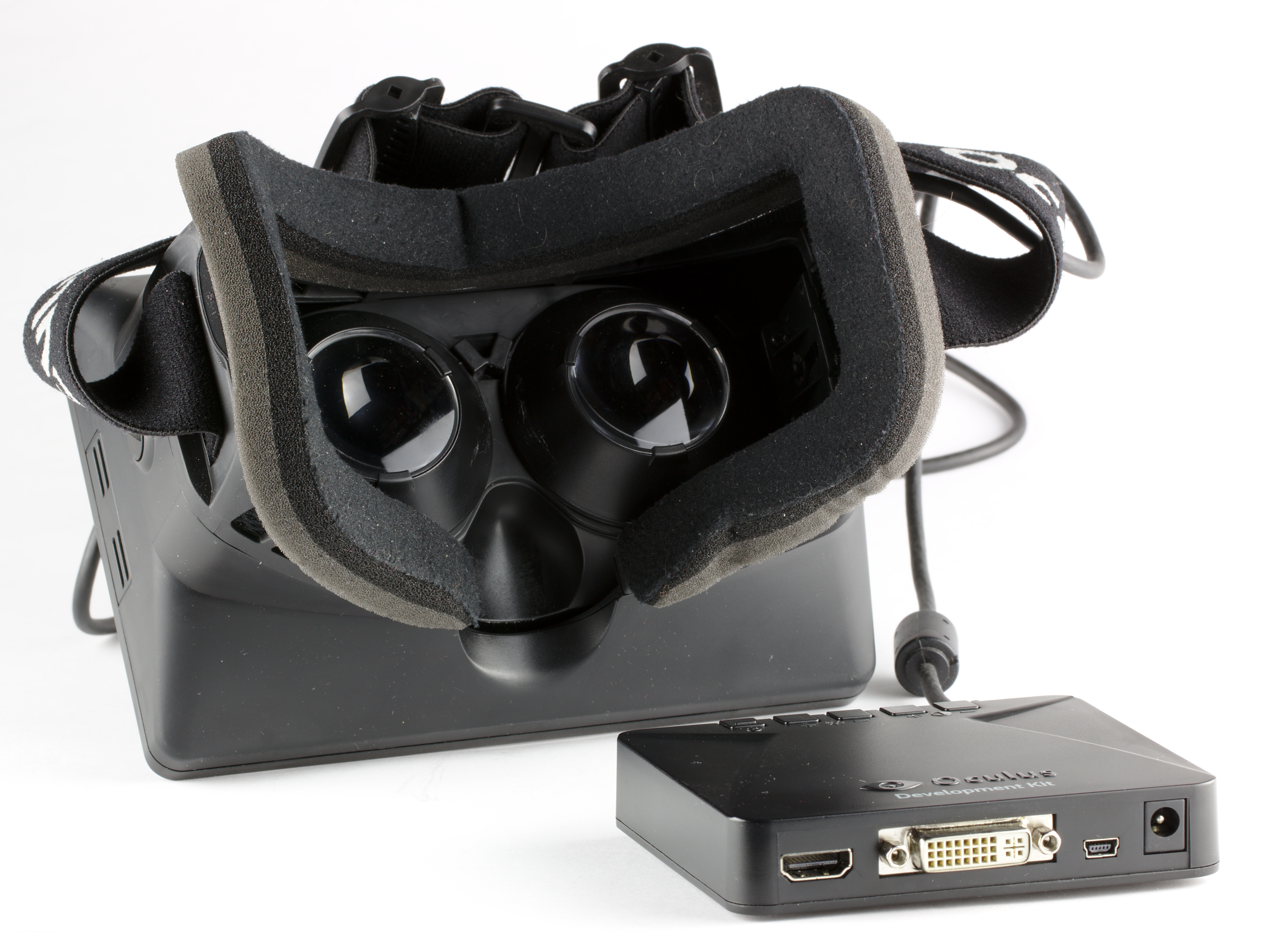
The headset display is well-crafted and durable, but drawbacks include the cost -- US$600 -- and the fact that it requires a powerful gaming system to run it, according to some reviews.
"Just as with every new technological milestone, it has the potential to change the world. But at this early stage, only a few can afford it," Devindra Hardawar wrote for Engadget.
The cost will come down and the quality will improve, but one overarching issue may remain for the foreseeable future: the fact that VR requires bulky hardware.
"When you first put on a Rift, you are all too aware of the headset. It's somewhat comfortable, but the way it envelopes your head can make it feel like a helmet," Gamespot's Peter Brown noted.


Gameplay on the Oculus Rift

The games are simple, yet far from being just proof of concept, Gizmodo's Mario Aguilar said. While unimpressed by the early development builds of the system and its games, he said he found himself being sucked in by the first wave of titles for the finished hardware.
Not every VR game is going to be an instant hit, Gamespot's Brown said, noting that EVE: Valkyrie is littered with microtransactions that detract from its initial appeal, while Lucky's Tale unnecessarily pads out levels.
"These issues can't take away from the fact that Rift delivers on its promise to enable more immersive and personal gaming experiences than we've ever seen before, Brown noted.

Outstanding Issues

The Oculus Rift shipped with its headset and a single Xbox controller, while a motion-supported controller is still in the works.
An upgrade may be in order for a fully immersive experience, according to Rob Enderle, principal analyst at the Enderle Group.
"It plays best with two external cameras and two VR controllers. It ships with one external camera and an Xbox controller, which cripples the experience," he told TechNewsWorld. "This will get fixed later in the year with a more expensive version."
The greater issue is that the Oculus Rift is a young system, so its developers have little in the way of data on what folks will do with it and how best to use it, suggested Enderle.

Cutting the Cord

Another common complaint is that gamers are very much tethered to the computer, limiting the VR experience.
"Once this connects with gaming stations designed for it and with 2D treadmills, this will likely change," added Enderle.
"Folks are also recognizing that the idea of being able to actually integrate the room, like with Microsoft's HoloLens, might be a really good idea now," Enderle noted.
"You have to realize that the ecosystem hasn't yet come up around this product, so it is best for those that like being on the cutting edge and are willing to do a little experimentation and troubleshooting," he added.

Zuckerberg's Big Bet

Oculus Rift started out with a Kickstarter campaign, but it took investment by Facebook to make it a reality. That gives the system an advantage, according to Roger Kay, principal analyst at Endpoint Technologies Associates.
"Rift is out in front of the pack; it's the one to beat," he told TechNewsWorld.
"Remember, Oculus is one of Mark Zuckerberg's big bets, and he paid $2 billion for a company with no revenue," Kay said.

VR vs. Augmented Reality

"To understand the development of the virtual reality market, it's helpful to consider the augmented reality market," he added. "Virtual reality is entirely immersive, but the market will develop more slowly."
That means that there could be a big hurdle to immediate adoption.
"Leading-edge segments, like gamers, are ready to accept this level of involvement/commitment, and there will be others over time," Kay said.
Future applications could include real estate sales or, as Volvo and Microsoft hope, auto room sales; it also could lead to personal videoconferencing and, of course, entertainment.
"Augmented reality, by contrast, has an immediate and easy-to-adopt benefit: overlay on your physical world," Kay suggested.
"Anyone can use that, so augmented reality [could] be more widespread than virtual reality in the initial market development," he noted. However, "Oculus has set the VR market pace with the now-available Rift.

Glitches Mar Makulu's Appeal

Makulu 10 Xfce edition continues developer Jacque Raymer's track record of pushing the limits with useful and innovative features to keep his distro line a step ahead of the crowd.
He released Makulu 10 Xfce this week after more than 12 months in the making. The focus on this build is stability, speed and social integration. After spending several frustrating days chasing away glitches, I found that the Xfce edition can claim success with two of those three goals.
I consistently have had trouble with Makulu, regardless of the desktop flavor. Those issues continued with the latest release.
To be clear, I tested the release on three computers with a range of specs that exceeded the hardware recommendations for the Makulu 10 release. I had major performance issues in every attempt.
The installations proceeded without anomalies. The OS performed with recurring glitches. The system appeared to shut down properly.


Three Strikes, You're Out

The major recurring problem is that on subsequent reboots, Makulu failed to boot. The system issued a diagnostic report that the X server suffered some internal error that disabled the MDM display manager.
I have used Makulu on various machines over the last few years. I constantly test Linux distros and other software. I routinely install most for testing and uninstall them when done. Few distros impress me enough to keep using them.
Not so with the Makulu line. I ran different versions of Makulu on various test computers. I alternated among Cinnamon, Aero, Unity, GNOME and Xfce flavors.
Eventually, each one fell out of favor. Not because I did not like using them. When they worked, the entire line was fun and inviting, but I was constantly addressing lockups and other hiccups.

From Bad to Worse

I had hoped the latest Xfce release would put all of that behind me. Alas, I spent several days gritting my teeth over glitches that made using that edition of Makulu not nice.
After several reinstallations and configuration adjustments, the problems finally seemed to have abated. They included corrupted package installations, browser lockups and video driver mayhem, despite a Makulu application that swapped and updated proprietary drivers.
The final blow came after working in the Makulu OS for uninterrupted hours. On several computers, I shut down the OS and powered off the computer. When I repowered the computer, Makulu failed to boot as explained above.

Makulu Highlights

I presume that the initial release code had an error somewhere that made its way into the ISO. No doubt the Makulu community will resolve the issue and make a replacement version available, so what follows is a review of the Makulu 10 Xfce performance between successful boot and shutdown during my testing days of working with it.
Makulu's name is derived from the word for "big chief" in the Zulu language. In a Linux world of countless distros offering the same old retreads of desktop environments, Makulu has the potential for being just that among other leading Linux lines. Makulu's novel tweaking of desktop designs makes the distro both appealing and innovative.

Makulu 10 Xfce
interface
The Xfce interface defies what you would expect in a lightweight desktop.

The Xfce desktop is one of the most classic lightweight desktops. Makulu pumps in just enough innovation and uniqueness to make Xfce seem more modern and entertaining. What Xfce lacks in animation, Makulu's treatment makes up for with integrated features and appealing desktop functionality.
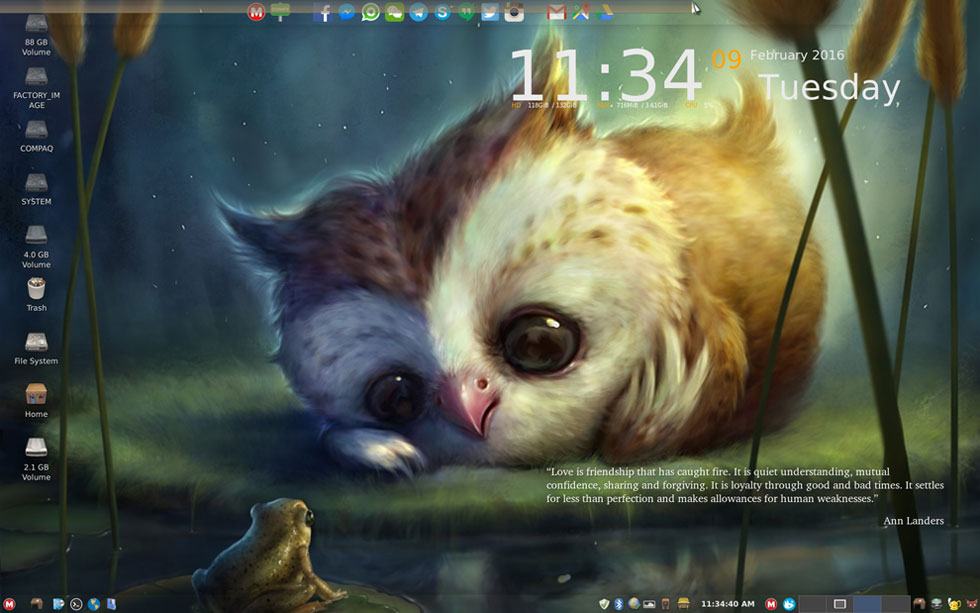
For example, it wraps into the Xfce desktop social app integration unmatched by other Linux distros. You can use applications such as WhatsApp, WeChat, Facebook, Twitter and Instagram on the fly. Forget about logging in to a website or installing a third-party app -- just click a button and you are in social business.
Plus, the desktop view is simply gorgeous. The background images are eye-popping. The upper-right quadrant of the screen is adorned with a time, date and system info display that actually is useful. In the bottom-right quadrant is a changing readout of quotes by a wide range of historical personalities.

Lucious Layout

The eye-catching visuals on every background image are part of the fun of using the latest Xfce release from Makulu. The other parts come from the desktop design and the unusual collection of software.

Makulu 10 screen
shot
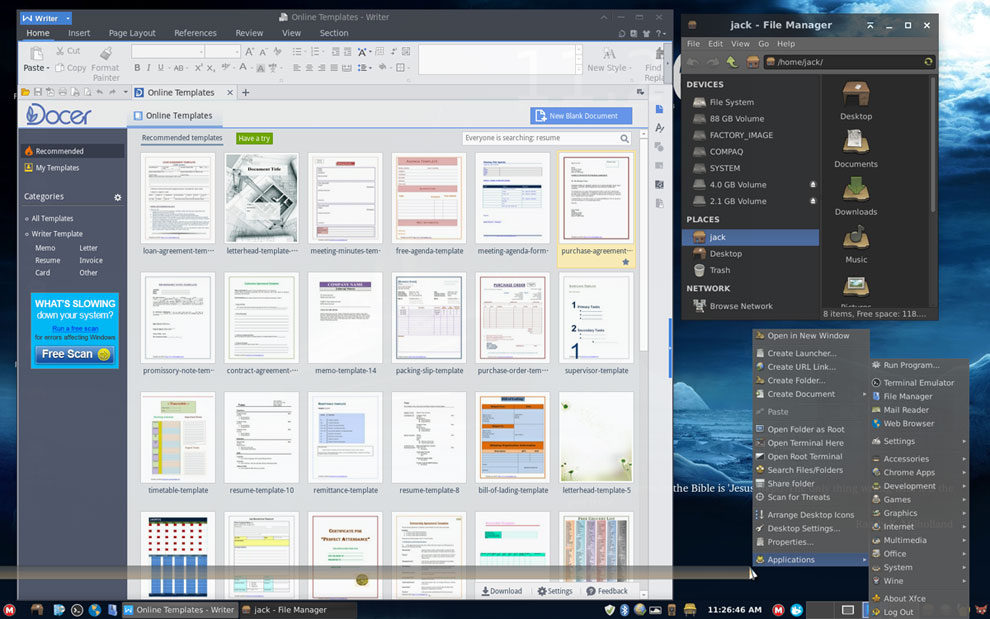
Makulu 10 includes an eye-popping collection of background images, two panels and access to all storage partitions.

I added the workspace switcher applet to the traditional bottom panel. The system positions it along the far right end of the panel. The panel constituents and some of the default software are different in this release compared with earlier versions.
The same icon is used to launch the Whisker menu at the far right end of the panel. The red and white M icon on the right side of the panel launches the Synapse search window. Also in the collection, on the right end of the panel among the expected system icons, is the launcher for Variety to navigate the background image display.
The left end shows icons for Show the desktop along with launchers for the Software Manager, Terminal Emulator, default Web browser and the Thunar File Manager.
The panel shows thumbnail labels of open windows in between the two notification areas. It looks like the panel bar is in two parts. The on-by-default 100 percent transparency setting gives the impression that the unfilled center portion of the panel is not there.
The left edge of the screen holds by default launchers for any mounted hard drive partition and attached storage devices. Push the mouse pointer into the top of the screen to pop down a second panel that functions like a launch dock for the integrated social media apps. These include Makulu Linux Live Chat, Facebook, Facebook Messenger, WhatsApp, WeChat, Telegram, Skype, Google Hangouts, Twitter, Instagram, Gmail, Google Maps and Google Drive.

Feature or Liability

The integrated functionality is a mixed bag. Each launcher you click either opens another instance of the Google Chrome browser or puts the social media app into another browser tab or overlapping window.
They create a dizzying collection of clutter on the screen. Use alt-tab keys to cycle among the open tabs and overlaying windows.
If you use the Google Chrome browser on multiple computers, this integrated social situation can cause an intrusion on devices that do not run Makulu Xfce. Makulu apparently installs each social media add-on into your Chrome extensions. They appear as enabled add-ons in each Google Chrome browser installation you have.

Software Savvy

MakuluLinux is built around an unusual set of software choices, some of which are not common to other Linux distros.
The Makulu line comes preinstalled with the WPS Office suite. You might know this product as Kingsoft Office from your mobile device apps. The Kingsoft Office suite bundles Kingsoft Writer, Kingsoft Spreadsheet and Kingsoft Presentation.
WPS is outside the normal package management system as it is proprietary, so you have to periodically update it through the Web browser to download the latest patch or version update and install it. WPS has great potential and a lot more functionality than AbiWord, which is the usual Xfce word processor.
This release uses the Google Chrome browser instead of the Chromium open source browser used in earlier versions. Makulu also preinstalls Wine to run Microsoft Windows programs and the two game platforms -- PlayOnLinux and Steam. Makulu Linux also includes a Chrome apps section in the menu to package all of the related Google services.
A killer app that makes using Makulu Linux well worth the setup struggles if you have more than one computer is the Makulu-Constructor. This application lets you make a one-to-one clone of your current Makulu system in an ISO format. You can use the ISO file to create a virtual machine installation or a handy reinstall backup file, or to clone your current installation on other hard drives.

Bottom Line

Makulu Xfce 10 has both Debian and Ubuntu 14.04 features and software, making it a hybrid. It fully supports the Ubuntu PPA feature for adding repositories and uses the Debian software center along with some of Ubuntu software's repositories. It also is based on the Linux kernel 4.2 and the latest Xfce 4.12 desktop environment.
I cannot recommend the current release. A Linux OS that is cantankerous and prone to the issues I experienced gives Linux on the desktop a bad rap.

Want to Suggest a Review?

Is there a Linux software application or distro you'd like to suggest for review? Something you love or would like to get to know?
Please email your ideas to me, and I'll consider them for a future Linux Picks and Pans column.
And use the Talkback feature below to add your comments! 

Operation Blockbuster Brings the Fight to Sony Hackers

Operation Blockbuster, a coalition of security companies led by Novetta, on Wednesday published a report detailing the activities of the Lazarus Group, the organization responsible for the 2014 cyberattack against Sony Pictures Entertainment.
Researchers last week published detection signatures to the companies' respective software in the hope of disrupting the group's activities.


The coalition's response has heavily wounded the malware arsenal the attackers used but has not eliminated the threats worldwide, Operation Blockbuster said.
Last year, researchers began identifying several malware hashes publicized by the security community following the Sony attack. From those hashes they established a baseline of the malware capabilities, common code and libraries used in the malware samples, according to the report.
They used the fragments of code and library functions to detect additional malware samples. They used proprietary tools and Totem, an open source Novetta-developed framework for large-scale file analysis and triage.
Refining that process led researchers to detect and analyze more than 45 distinct malware families related to the Sony malware, according to Brian Bartholomew, a researcher at coalition member Kaspersky Lab.
"I think we are definitely putting a dent in their operation. I don't think it is going to make them disappear, but it is definitely causing them some headaches," he told the E-Commerce Times.
Other members of Operation Blockbuster include AlienVault, Invincea, PunchCyber, Symantec, ThreatConnect and Volexity.


Measured Tactics

The Lazarus Group has conducted multiple attacks over at least six years, the most-well-known being the attack against Sony. The group also is responsible for some 43 malware families, said Bartholomew.
"They moved the line in the sand. They are still out there and functioning," he said.
The malware definitely poses a real threat all over the world, Bartholomew said. The attackers were not very selective about their targets, and they have played by a different set of rules.
Still, the progress the coalition has made in countering the massive malware attacks is impressive, according to Andrew Ludwig, senior technical director at Novetta who led the report.
"The biggest change comes with the identification and analysis of such a vast array of unique malware tools and capabilities that are all interrelated," he told the E-Commerce Times.

Ever Present Threat

Hacking groups are spawning because hacking is effective in cybercrime and cyber espionage.
Revelation of the activities conducted by the Lazarus Group is proof of the growing problem, according to Ben Johnson, chief security strategist at Carbon Black.
"The big reveal that the Lazarus Group exists does not increase or change the current state of the threat landscape. It underscores that there are many other groups like this one that are acting with the intent to exfiltrate valuable data from an organization, potentially pin their attack on another group or country and act in accordance with whatever code they have set forth," told the E-Commerce Times.
The details the report provides does little to change the malware landscape, noted Jeff Reingold, co-founder of Panurgy. All that's new are reported details of the multiyear efforts and investigation by Novetta and others to gain more detail into who was behind the Sony Pictures attack, the specific malware code and techniques used.
"While the results of the investigation may help make a dent in the possible further damage that could be done by Lazarus or others using those same malware tools, it does not change the landscape much regarding ongoing and future attacks aimed at data theft and/or destruction," he told the E-Commerce Times.

What To Do About It

A good defense and a strong offense are tactics to continue countering malware organizations.
The Operation Blockbuster report suggests that the Lazarus Group is a formidable threat actor capable of causing reputational and operational harm, noted Norman Comstock, researcher for the Berkeley Research Group.
It accomplishes this "by exfiltrating and leaking data, impairing system availability or recoverability with great patience and obfuscation," he told the E-Commerce Times.
A full-frontal counterattack across borders poses many risks, noted Nathan Wenzler, executive director of security at Thycotic.
Dealing with a politically volatile group makes it difficult for cyberattack victims to do anything directly without it being seen as an act of aggression or even an act of war, he told the E-Commerce Times.
"Barring that, however, there are many defensive measures that corporations and government agencies should be implementing in order to defeat the types of attacks coming out of this group," Wenzler said.